
Before you change payroll deductions, confirm the two plan features you need, calculate the room employer contributions leave behind, and learn where taxable earnings can appear.
A mega backdoor Roth is not a special account. It is a two-step process inside an employer retirement plan.
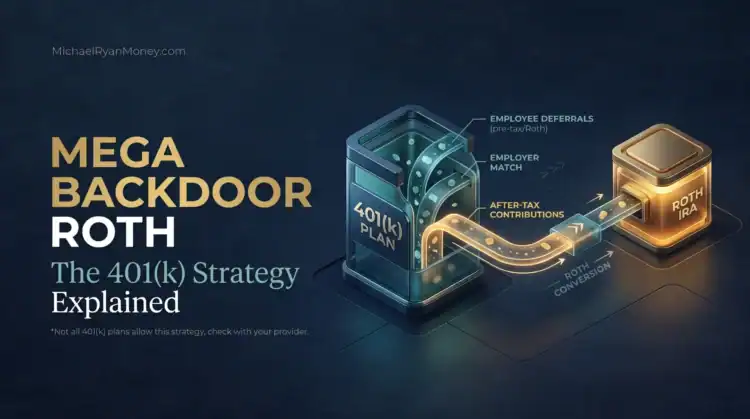
First, you make voluntary non-Roth after-tax contributions to your 401(k) or similar defined-contribution plan. Then you move that money into Roth, either through an in-plan Roth rollover or an in-service direct rollover to a Roth IRA.
That sounds simple. The catch is that your plan has to provide both steps. A Roth 401(k) option by itself is not enough.
Under IRS Notice 2025-67, the headline annual-additions limit for 2026 is $72,000. But that is not a personal contribution allowance. Your regular employee deferrals, employer match, profit sharing, other employer contributions, and voluntary after-tax contributions generally share that ceiling. Your actual limit can also be lower if your eligible compensation is below $72,000 or your plan imposes a tighter cap.
- Gate 1: Your plan accepts voluntary non-Roth after-tax employee contributions.
- Gate 2: Your plan lets you convert that source in the plan or distribute and directly roll it to a Roth IRA while you are still employed.
- Then the math: Calculate what the IRS ceiling, employer contributions, compensation, and plan rules leave available.
This is an educational guide, not permission to change your contribution election. Your plan document and administrator control what you can actually do.
On This Page
- Does your 401(k) actually allow a mega backdoor Roth?
- Mega backdoor Roth vs. backdoor Roth IRA
- How much mega backdoor Roth room do you have in 2026?
- What happens after you make the after-tax contribution?
- Ask your 401(k) administrator these questions
- Common ways a mega backdoor Roth goes wrong
- When should you pause before using the strategy?
- Your next step
- Sources
Does your 401(k) actually allow a mega backdoor Roth?
Start by asking whether your plan has a separate contribution source labeled something like “after-tax,” “voluntary after-tax,” or “employee after-tax.”
That source is not the same as a Roth 401(k) contribution.
Both come out of your paycheck after income tax. But a Roth 401(k) contribution is an elective deferral that starts in a designated Roth account and counts toward the regular $24,500 employee deferral limit for 2026. A voluntary after-tax contribution starts as basis, meaning money already taxed, in a non-Roth plan source and generally uses room under the larger Section 415(c) annual-additions limit.
I would not ask the benefits center, “Does my plan have a Roth option?” That question is too broad. Plenty of plans offer Roth 401(k) deferrals and still do not support a mega backdoor Roth.
01 / Eligibility
Two gates. Both must open.
Roth 401(k) deferrals are not enough.
Check the second gate.
After-tax contributions alone do not complete the strategy.
Confirm the plan’s limits.
- Does the plan accept voluntary non-Roth after-tax employee contributions that are separate from Roth 401(k) deferrals?
- Can that after-tax source be moved to Roth through an automatic or manual in-plan Roth rollover, or through an in-service direct rollover to a Roth IRA?
If the first answer is no, the strategy is not available in that plan.
If the first answer is yes but the second answer is no, you may be able to contribute after tax, but you do not have a practical mega backdoor path while the money remains in the plan. The principal has already been taxed, while future earnings in that source remain pretax. That can create more recordkeeping and future tax friction without delivering the Roth result you expected.
If both answers are yes, you have cleared the basic eligibility test. You still need to confirm plan caps, conversion frequency, fees, employer contribution timing, and nondiscrimination restrictions before deciding on an amount.
Mega backdoor Roth vs. backdoor Roth IRA
The names are similar because both strategies can move after-tax dollars into Roth. The starting account, limits, paperwork, and failure points are different.
Similar names, different starting accounts
Ordinary backdoor Roth IRA
Traditional IRA → Roth IRA
- 2026 IRA limit
- $7,500; $8,600 if age 50 or older
- Main tax check
- Form 8606 and IRA pro-rata rules
Mega backdoor Roth
401(k) non-Roth after-tax source → eligible Roth rollover
- Potential room
- Remaining Section 415(c) annual-additions space
- Main eligibility check
- Both employer-plan features must exist
These two paths may both be possible in one year, but the separate rules for each still apply.
Ordinary backdoor Roth IRA
An ordinary backdoor Roth usually starts with a nondeductible contribution to a traditional IRA, followed by a conversion to a Roth IRA.
For 2026, the regular IRA contribution limit is $7,500, or $8,600 if you are age 50 or older. Form 8606 tracks nondeductible basis and the conversion. Traditional, SEP, and SIMPLE IRA balances can affect the taxable calculation under the IRA pro-rata rules.
Mega backdoor Roth
A mega backdoor Roth starts in an employer plan with voluntary non-Roth after-tax employee contributions. The potential room is tied to the Section 415(c) annual-additions system, and the plan must allow the necessary contribution and Roth movement features.
The short version is this: the ordinary backdoor starts in an IRA. The mega backdoor starts in an employer plan, and the plan has to provide the necessary doors.
For the traditional-IRA version, the ordinary backdoor Roth IRA guide explains the contribution, pro-rata and Form 8606 checks that are different from employer-plan rules.
You may be able to use both strategies in the same year because they use different contribution limits. But each strategy still has its own rules. Using a mega backdoor Roth does not make an IRA pro-rata issue disappear, and an IRA balance does not automatically prevent a plan-based mega backdoor Roth. For the rules on using an IRA and a 401(k) in the same year, see the separate account-eligibility guide.
For a broader comparison of the destination accounts, see our guide to Roth 401(k) vs. Roth IRA.
How much mega backdoor Roth room do you have in 2026?
The clean calculation starts with the smaller of:
- $72,000, or
- 100% of your eligible Section 415 compensation.
Then subtract the annual additions already made or expected for you.
Estimated potential after-tax room:
- Applicable annual-additions ceiling
- minus regular pre-tax and Roth employee deferrals
- minus employer match
- minus employer profit-sharing or nonelective contributions
- minus allocated forfeitures and other counted annual additions
Then apply any lower plan-specific after-tax cap.
The result is an estimate to confirm with the administrator. It is not a green light from the IRS or your plan.
The $72,000 limit is shared space
Start with the lesser of $72,000 or 100% of eligible Section 415 compensation.
- Subtract regular employee pre-tax and designated Roth elective deferrals (excluding valid catch-up contributions).
- Subtract projected employer match, true-up, profit-sharing, nonelective contributions, allocated forfeitures, and other annual additions.
- Apply any smaller plan-specific after-tax cap, testing restriction, or payroll limit.
Result: estimated room to confirm with the administrator. It is not authorization to contribute that amount.
Start with the lesser of $72,000 or 100% of compensation
The $72,000 figure gets most of the attention. The compensation limit is easy to miss.
If your eligible compensation is $60,000, your Section 415(c) ceiling generally cannot be $72,000. It is limited to 100% of eligible compensation, subject to the plan’s definition and limitation year.
This can matter in a partial employment year, after a job change, or when a plan uses a compensation definition that does not match the number you had in mind.
Subtract employee and employer annual additions
Do not take $72,000 and subtract only your $24,500 employee deferral.
Employer money uses the same annual-additions ceiling. That can include a regular match, a year-end true-up, profit sharing, nonelective contributions, and allocated forfeitures.
Here is a straightforward example.
You are under age 50, earn $150,000, defer $24,500, and expect $10,000 of employer contributions.
$72,000 – $24,500 – $10,000 = $37,500
Your estimated after-tax room is $37,500 before any lower plan cap, ACP testing restriction, or other annual addition.
02 / Contribution room
One $72,000 ceiling. Three uses.
Example: $150,000 eligible compensation, $24,500 regular deferrals, $10,000 employer additions.
Not guaranteed. Compensation limits, plan caps, ACP testing, forfeiture allocations and true-ups may reduce the amount.
Now consider a 55-year-old employee earning $220,000. The employee makes the regular $24,500 deferral, expects $12,000 of employer additions, and makes an eligible $8,000 catch-up contribution.
$72,000 – $24,500 – $12,000 = $35,500
The estimated after-tax room is $35,500. The valid catch-up contribution sits outside the $72,000 annual-additions calculation.
One more example shows why the compensation rule matters. An employee earns $60,000, defers $15,000, and receives $3,000 from the employer.
$60,000 – $15,000 – $3,000 = $42,000
The starting ceiling is $60,000, not $72,000. The plan may impose a much lower practical cap based on payroll percentages or other provisions.
Financial Clarity Newsletter
The plan details decide whether a Roth strategy works. Get practical money explanations, the catches people miss, and what they mean for your retirement decisions.
Get the Financial Clarity Newsletter
Weekly, when there is something worth sending. Confirm your email to subscribe.
Keep catch-up contributions separate
For 2026, the general age-50 catch-up limit is $8,000. The catch-up limit is $11,250 for an employee who attains age 60, 61, 62, or 63 during the year.
A valid catch-up contribution generally does not reduce the $72,000 annual-additions room. It still has to be allowed and administered by the plan.
For 2026, employees whose prior-year FICA wages (generally W-2 Box 3) from the sponsoring employer exceeded $150,000 generally must make catch-up contributions as designated Roth contributions. This is separate from the mega backdoor strategy. Confirm the plan’s Roth catch-up arrangements.
A fill-in worksheet
Use projected full-year amounts, not just year-to-date totals:
- Enter $72,000 or 100% of eligible plan compensation, whichever is lower: ______
- Subtract projected full-year regular pre-tax and Roth employee deferrals, excluding valid catch-up: ______
- Subtract projected full-year employer match and true-up: ______
- Subtract projected full-year profit sharing, nonelective contributions, forfeiture allocations, and other annual additions: ______
- Room before the plan cap, floored at zero: ______
- Convert the plan's lower after-tax cap to a dollar maximum, if needed: ______
- Estimated after-tax room is the lower of the prior two lines, floored at zero: ______
For example, a plan cap of 10% of $150,000 of eligible compensation is a $15,000 maximum. If your room before the plan cap is $37,500, your estimate is $15,000, subject to the plan’s payroll rules and compensation definition.
If the employer contribution is uncertain, I would not fill every theoretical dollar of room early in the year. Ask whether the plan protects space for a later match or profit-sharing contribution. If it does not, use a buffer.
What happens after you make the after-tax contribution?
The second step is moving the after-tax source into Roth. Plans usually support one of two paths, if they support the strategy at all.
03 / Money flow
Follow the $30,600
$30,000 already-taxed basis + $600 pretax earnings
Path A · In-plan Roth rollover
$30,600 → designated Roth account.
$30,000 basis is not taxed again. $600 pretax earnings generally are taxable on conversion.
Path B · Eligible in-service direct rollover
$30,000 basis → Roth IRA.
$600 pretax earnings → traditional IRA or another eligible plan if distribution and allocation rules permit. If all $30,600 goes to Roth, $600 is generally taxable.
Plan permission matters. Notice 2014-54 does not create an after-tax-only partial distribution right.
In-plan Roth rollover
The plan moves the voluntary after-tax source into its designated Roth account.
Some plans automate this after each payroll contribution. Others require a website election or phone call. Some allow only a limited number of conversions each year.
Federal tax law permits an in-plan Roth rollover of eligible vested balances, including after-tax contributions and earnings. The plan decides which sources qualify and how often the transaction can occur.
The after-tax principal is basis, so it is not taxed again. Earnings that accumulated before the conversion are generally taxable.
For example, suppose the after-tax source contains $30,000 of contributions and $600 of earnings when it is converted.
- $30,000 is after-tax basis.
- $600 is generally taxable income for the year of the conversion.
A direct in-plan Roth rollover generally has no mandatory withholding. If the conversion includes taxable earnings, you may need to increase paycheck withholding or make an estimated tax payment.
The in-plan rollover cannot be recharacterized and reversed later. This is one reason to verify the source and amount before confirming the transaction.
In-service direct rollover to a Roth IRA
The plan distributes an eligible amount while you are still employed and sends it directly to a Roth IRA.
This route exists only when the plan allows an in-service distribution of that contribution source. The plan may impose age, service, frequency, minimum, or source-level restrictions.
IRS Notice 2014-54 can allow after-tax basis from one distribution to go to a Roth IRA while associated pretax amounts go to a traditional IRA or another eligible plan. The important qualification is that the distribution itself still follows the applicable allocation rules. The notice does not let you invent an after-tax-only partial distribution while leaving every associated pretax dollar behind.
Using the same $30,000 basis plus $600 earnings example, one permitted direct-rollover treatment may send $30,000 to a Roth IRA and $600 to a traditional IRA or another eligible plan. If the full $30,600 instead goes to the Roth IRA, the $600 of pretax earnings is generally taxable. Confirm the available destinations and exact transaction with the plan before the distribution begins.
Use a direct rollover when possible. If untaxed money is paid to you, the plan generally withholds 20% for federal income tax even if you intend to complete a 60-day rollover.
Why conversion timing matters
The longer after-tax money sits before the Roth move, the more pretax earnings can accumulate.
That does not make a delayed conversion automatically bad. But it changes the tax result and adds recordkeeping.
An automatic or frequent direct conversion is usually the cleanest operational setup because it limits the time available for earnings to build. Still, check fees, investment restrictions, settlement delays, and whether the plan leaves converted money sitting in cash.
For the broader tax rules that apply to Roth conversions, read Roth Conversion Rules for 2026.
Ask your 401(k) administrator these questions
You can paste these into a secure message or use them on a benefits-center call.
Ask these two questions first
- Does the plan accept separate voluntary non-Roth after-tax contributions?
- Does the plan permit an eligible in-plan Roth rollover or in-service direct rollover while employed?
If both answers are yes, use the full checklist below to verify limits, fees, timing and tax reporting. Ask for written confirmation.
- Does this plan accept voluntary non-Roth after-tax employee contributions that are separate from Roth 401(k) deferrals?
- What employee-specific dollar, percentage-of-pay, per-paycheck, bonus, or highly compensated employee cap applies to that source in 2026?
- What is the plan's Section 415 limitation year and definition of eligible compensation?
- Which projected match, true-up, profit-sharing, nonelective, and forfeiture allocations must be included in my annual-additions total?
- Will payroll stop my after-tax contribution automatically before I exceed the applicable limit or crowd out an employer contribution?
- Does the plan offer a match true-up? Must I contribute during every pay period to receive the full match?
- Does the plan allow automatic in-plan Roth conversion of the after-tax source? How do I activate it, how often does it run, and is there a settlement delay?
- If conversion is not automatic, can I request a manual in-plan Roth rollover? How often, and are there minimums, fees, or blackout periods?
- Does the plan permit an in-service direct rollover of the after-tax source to a Roth IRA while I remain employed? What conditions and frequency limits apply?
- If one distribution contains after-tax basis and associated pretax amounts, can the provider send them to separate eligible destinations in the same transaction?
- How can ACP nondiscrimination testing affect my after-tax contribution election, especially if I am classified as a highly compensated employee?
- What tax forms will the plan issue, where will basis and taxable earnings appear, and would any federal withholding apply?
- What happens to the after-tax source and automatic conversion if I leave the employer midyear?
- Can you send me the relevant Summary Plan Description section or written confirmation of these features?
The recordkeeper’s brand does not answer these questions. Two employers can both use Fidelity or another large provider and offer completely different plan features.
Common ways a mega backdoor Roth goes wrong
Three failures to catch before payroll
Wrong contribution source
Roth 401(k) deferrals are not the voluntary non-Roth after-tax source. Verify the exact plan election.
Only one gate is open
After-tax contributions without a usable Roth route can create tax and recordkeeping friction without the expected Roth result.
No employer buffer
A later match, true-up, profit-sharing allocation, or ACP restriction can shrink theoretical room. Ask how payroll prevents excess additions.
Selecting Roth 401(k) instead of non-Roth after-tax
The employee increases Roth deferrals and assumes the mega backdoor is active. But Roth 401(k) deferrals use the regular $24,500 limit and are not the separate contribution source this strategy requires.
Prevention: Confirm the exact source name before changing payroll.
The plan allows after-tax contributions but no usable Roth path
Money enters the after-tax source, but the plan does not allow an in-plan rollover or an in-service distribution while the employee is working.
Prevention: Clear both eligibility gates before contributing.
Employer money is left out of the calculation
The employee subtracts $24,500 from $72,000 and contributes the difference, overlooking match, profit sharing, or a year-end true-up.
Prevention: Get an estimate of all employer annual additions and ask how the plan prevents an excess.
Front-loading costs part of the match
The employee fills the after-tax source early and stops contributing later. If the employer matches per paycheck and the plan has no true-up, the employee may miss employer money.
Prevention: Confirm the match formula and true-up before front-loading.
Earnings are assumed to be tax-free before conversion
The contribution principal is basis. Earnings in the non-Roth after-tax source are generally pretax until moved correctly.
Prevention: Convert promptly when the plan allows it and verify the taxable amount on the transaction confirmation and tax form.
The rollover is paid to the employee
A check payable to the participant can trigger mandatory withholding on untaxed amounts and a 60-day deadline.
Prevention: Ask for a direct rollover between trustees or plan accounts.
ACP testing reduces or refunds contributions
A plan can permit after-tax contributions and still restrict what a highly compensated employee may keep because of nondiscrimination testing.
Prevention: Ask about current HCE caps and the plan’s history of refunds. Treat the theoretical IRS room as a ceiling, not a promise.
The money reaches Roth but sits uninvested
The conversion works, but the destination account holds cash because investment instructions did not carry over.
Prevention: Verify the destination investment after the first conversion.
A multiple-employer year is treated like simple subtraction
The elective-deferral and annual-additions aggregation rules can apply differently across employers and related businesses.
Prevention: Get plan-specific and tax advice before using a simple calculator in a job-change or multiple-employer year.
When should you pause before using the strategy?
A mega backdoor Roth can create valuable Roth space. That does not make it the next best dollar for every household.
Pause when:
- You have not captured the full employer match.
- Emergency savings or near-term cash needs are thin.
- High-interest debt is still competing for the same dollars.
- Employer contributions are uncertain and the plan does not protect room automatically.
- The plan lacks a convenient conversion path or charges meaningful transaction fees.
- A job change is likely and the payroll or distribution timeline is unclear.
- You need personalized help deciding between additional pre-tax, Roth, taxable, and liquidity priorities.
The goal is not to force the biggest possible number into the plan. The goal is to use a real plan feature without creating a payroll, tax, or cash-flow problem.
Your next step
Get the two required features confirmed in writing. Then calculate room conservatively, including employer money and any lower plan cap.
If the plan supports automatic conversion, ask how to activate it. If it requires manual action, put the conversion schedule on your calendar. After the first payroll contribution, verify four things:
04 / Verify execution
First paycheck: four checks
Separate non-Roth after-tax source?
Eligible Roth movement completed?
Basis and earnings recorded separately?
Roth destination invested as intended?
Done only when all four are verified. Retain confirmations and reconcile the year-end tax form.
- The money posted to the correct non-Roth after-tax source.
- The Roth conversion or direct rollover completed.
- The transaction confirmation shows after-tax basis and any pretax earnings separately.
- The destination balance is invested as intended.
Keep the Summary Plan Description, transaction confirmations, year-end statements, and Form 1099-R with your tax records.
That is the part of the strategy worth getting right. The $72,000 headline is useful. The plan details decide whether it is real for you.
