


The best budgeting app is not the app with the longest feature list. It is the one that matches how much attention you actually want to give your money.
I spent nearly three decades in financial planning, and one pattern comes up over and over: people rarely fail because they picked a terrible budgeting tool. They fail because they picked a perfectly good tool that expected them to behave like somebody else.
A hands-on planner may love assigning every dollar a job. Another person would rather connect the accounts once, glance at the dashboard twice a week, and be left alone. A couple may need shared visibility more than perfect category rules. And somebody with investments, retirement accounts and a mortgage may care more about net worth and the whole picture than whether restaurants were $37 over budget.
That is why I am not going to hand you one fake “#1 budgeting app” trophy. I am going to help you diagnose how you want to manage money, then match the app to the job.
Michael’s Take
The best app is the one whose required effort is lower than your willingness to use it. If the app needs ten minutes every day and you realistically have ten minutes every Sunday, that mismatch matters more than whether it has three extra charts.
Show the 30-second version
- Best free big-picture dashboard: Empower is my first look if you want free spending, net-worth, investment and retirement tracking in one place and do not need strict zero-based budgeting.
- Best hands-on system: YNAB is a strong fit if you want to actively plan where your money goes and are willing to learn its method rather than just watch transactions roll in.
- Best all-around household dashboard: Monarch Money is a strong fit for couples and households that want shared visibility, customization and a broad financial dashboard without using a strict envelope method.
- Best lighter-touch spending plan: Quicken Simplifi is worth a look if you want recurring bills, planned spending and a clear amount left to spend without managing every dollar manually.
- Best design-first tracker: Copilot is a strong fit for people who care about a polished interface, automatic categorization and a modern web/Apple experience.
- Best subscription-first option: Rocket Money makes the most sense when your real problem is recurring subscriptions, bill monitoring and cancellation help rather than deep budgeting methodology.
Want the shortcut? Use my Budget Co-Pilot Finder below. It is designed around the questions that actually change the recommendation, not a generic list of apps.
Budget Co-Pilot Finder · about 60 seconds
What Kind of Budgeting App Will You Actually Keep Using?
Do not choose the app first. Choose the relationship you want with your money first. These five questions focus on the effort and workflow you are realistically willing to maintain.
No balances, income, account numbers, or other financial values are requested or submitted by this tool.
Question 1 of 5 · 20%
Your strongest starting point
This is a workflow match, not a universal “best app” ranking. Change an answer and the result may change.
Why this matched
Strongest fit
Watch for:
Closest alternative
Why it lost:
The decision hinge
What to look at next
Jump to the matching section below, then compare the tradeoff against your runner-up before paying or connecting accounts.
Provider capabilities and article fit framework reviewed September 10, 2026. Pricing, features, bank connectivity, and privacy practices can change; verify current provider terms before paying or linking accounts.
Table of Contents
Start Here: How Much Budgeting Do You Actually Want to Do?
This is the first question because it eliminates more bad matches than price, star ratings or a 40-row feature chart.
Hands-On: “I Want to Tell Every Dollar What to Do”
You are not looking for an expense tracker. You want a decision system. You are willing to review categories, move money when plans change, reconcile accounts and think before spending.

Start with YNAB. Its method is intentionally active. That is its strength and its warning label. Current YNAB pricing is $109 per year or $14.99 per month, and one subscription can include up to five additional people through YNAB Together.
This is also where Reddit is useful. The praise and the complaints often describe the same thing: YNAB asks for attention. People who want that involvement call it life-changing. People who expected a passive Mint replacement often call it work. Both can be right.
Guided Automation: “Do the Busywork, But Let Me Stay in Control”
This is probably the widest group. You want bank syncing, automatic categorization, recurring-bill detection and useful trends, but you still want to adjust categories, set goals and understand what is happening.
Monarch Money, Quicken Simplifi and Copilot are the three I would compare first. They all reduce data-entry work, but they feel different. Monarch leans toward an all-in-one household financial dashboard. Simplifi centers its Spending Plan around income, bills, subscriptions, planned expenses and what is left to spend. Copilot leans heavily into visual design, automatic categorization, transaction review and a polished account/spending/investment view.
Low-Maintenance: “Please Tell Me What Changed and Leave Me Alone”
If you want a budgeting app to behave like a quiet smoke detector, do not buy a system that wants a daily relationship.
For this reader, I care more about automatic transaction import, recurring-charge detection, simple spending summaries and a clear “what should I look at?” signal than elaborate category planning. Simplifi, Rocket Money and some lighter automated trackers deserve more attention here than a strict zero-based tool.
Big Picture: “I Care More About My Whole Financial Life Than a Perfect Monthly Budget”
This is the category where Empower makes the most sense to me.
Empower’s free Personal Dashboard can link checking, savings, credit cards, loans, mortgages and investment accounts, then show spending, net worth, investment allocation and retirement-planning information in one place. Its budgeting features are not as strict or behaviorally demanding as YNAB. That is not a defect if your real question is, “How does all of my money fit together?”
Affiliate disclosure: Empower is a sponsored partner. I may earn compensation if you use my link. That does not change the fit test in this guide: I recommend it when the reader’s job matches what Empower actually does well.
The 5 Questions That Actually Decide Your Best Budgeting App
Before comparing brands, answer these five questions. If you and I were looking at this together, these are the questions I would care about first.
1. How involved do you want to be?
Daily / active: YNAB or another envelope-style system. Weekly / guided: Monarch, Simplifi or Copilot. Mostly passive: lighter automated tracking or Rocket Money. Big picture: Empower.
2. What are you actually trying to manage?
Monthly spending? Cash flow? Subscriptions? Debt payoff? Shared household money? Investments and net worth? Retirement planning? “Budgeting app” is one search term hiding six different jobs.
3. Where will you really use it?
If you live on your phone, mobile experience matters. If you do serious money work on a laptop, web access matters. Copilot now has a web app alongside iPhone, iPad and Mac, but its web feature set is still not identical to every native app. Goodbudget works across web, iPhone and Android. Rocket Money offers web access with Premium.
4. Who else needs to use it?
A “best app for couples” list misses the real question. Do both people want to budget? Do you share everything, keep some accounts separate, or just need visibility into household bills? YNAB Together supports up to six people total. Monarch is built around household collaboration. Goodbudget can sync a household budget across devices. The right answer depends on how the household actually operates.
5. How much automation and account access are you comfortable with?
Some people want every account connected and categorized automatically. Others want manual entry, spreadsheet-like control or no continuous bank connection at all. Do not treat “more automation” as automatically better. It is only better if you want it.
If the hard part is not choosing software but creating the actual plan, use my step-by-step guide to building a spending plan. The app should support the plan, not replace the thinking.
Best Budgeting Apps by How You Manage Money
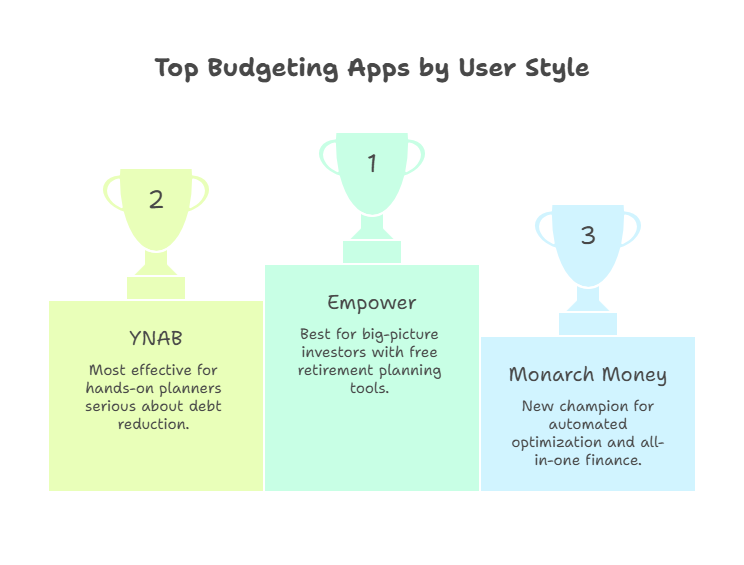
Empower: Best Free Choice for the Big-Picture Money Manager
Best fit: You want one free dashboard for spending, cash flow, net worth, investments and retirement planning.
Empower is still my favorite starting point for somebody whose financial life has outgrown a simple monthly budget. Its Personal Dashboard can aggregate banking, credit, loans, mortgages and investments. It also includes tools for net worth, transactions, investment analysis and retirement scenarios.
Why I like it: you can see whether this month’s spending is moving the bigger plan forward without paying for the dashboard.
Skip it if: you want a strict envelope or zero-based budgeting system that requires you to assign every dollar before spending it.
There is also a commercial reality worth being transparent about: Empower has an affiliate program, and this site can be compensated for qualified referrals. I would rather tell you that plainly than pretend affiliate economics do not exist. Reader fit comes first; compensation is allowed to break a tie, not manufacture a winner.
YNAB: Best for Hands-On Budgeters Who Want Behavior Change
Best fit: You want to decide what your money should do before it disappears.
YNAB is not just an expense tracker. Its system is designed around active planning. That is why I like it for people who want more intentional spending, sinking funds for irregular expenses and a clear plan for the money they already have.
Current price: $109 per year or $14.99 per month, with a 34-day trial. YNAB Together allows the group manager to invite up to five additional people under one subscription.
Skip it if: the phrase “review every transaction” already makes you tired. That is not a moral failing. It means your adherence risk is high, and adherence beats theoretical perfection.
Monarch Money: Best for Couples and a Shared Household Dashboard
Best fit: You want shared household visibility, flexible budgeting, goals, net worth and investments in one polished system.
Monarch’s appeal is breadth. It is a strong Mint-style replacement for households that want one place to see accounts and organize spending without adopting YNAB’s full methodology.
Current Core pricing: $14.99 per month or $99.99 per year before temporary promotional pricing. It is frequently promoted with introductory discounts, so verify the checkout price rather than treating a coupon as the permanent cost.
Skip it if: you are paying mainly for investment tracking and your investment accounts are the part you care about most. Current user discussions still surface account-sync and investment/goal frustrations, so I would test your actual institutions during the trial before committing for a year.
Quicken Simplifi: Best for “Just Tell Me What I Have Left to Spend”
Best fit: You want automated cash-flow organization without turning every dollar into a separate assignment.
Simplifi’s Spending Plan organizes income, bills, subscriptions, planned expenses and savings, then updates what is left to spend as transactions arrive. That is a very different mental model from a zero-based budget, and for some people it is exactly the point.
Skip it if: you want a highly collaborative household experience or a deeply manual envelope system. Also pay attention to current promotional pricing versus the regular renewal price.
Copilot Money: Best for Design-First Automated Tracking
Best fit: You want a polished interface, automatic categorization, recurring-charge visibility, investment/net-worth tracking and the ability to review rather than manually enter most transactions.
Copilot currently costs $95 per year or $13 per month. It is available on iPhone, iPad, Mac and the web. The web app has improved substantially in 2026, although Copilot’s own documentation says some features still differ from the native apps.
Skip it if: Android is central to your workflow or you expect every feature to be identical across web and native apps today.
Rocket Money: Best When the Real Problem Is Subscriptions and Bills
Best fit: You keep discovering recurring charges, want subscription monitoring, or value cancellation and bill-negotiation help more than a sophisticated budgeting method.
Rocket Money has a free tier with subscription tracking, budgeting and bill reminders. Premium adds features such as cancellation help, custom budget categories, net-worth tracking and more frequent syncing. Its Premium price uses a sliding-scale model that can vary. Bill negotiation is a separate service where, if Rocket Money succeeds, the fee can be 35% to 60% of the first year’s savings unless included through a higher-tier offering.
Skip it if: you want the budgeting methodology itself to be the main product. Rocket Money can budget, but its clearest differentiation is helping you find and manage recurring costs.
If you are specifically deciding whether Rocket Money is worth using, my Rocket Money review owns that deeper question.
Goodbudget: Best Free-ish Envelope Option for Manual Control
Best fit: You like envelope budgeting, want web + iPhone + Android access, and either prefer manual entry or are comfortable paying for automatic bank sync.
Goodbudget’s free plan currently includes 10 regular envelopes, 10 additional envelopes, one account, two devices and one year of history. Premium is $10 per month or $80 annually and adds automatic U.S. bank sync, unlimited accounts/envelopes, five devices and longer history.
Skip it if: you want broad investment and retirement analytics. This is much more of a budgeting system than a wealth dashboard.
Two More Budget Apps Worth Knowing: EveryDollar and PocketGuard
I would not make the main comparison table 20 apps wide just to look comprehensive. But two other names deserve a quick fit check. EveryDollar is Ramsey Solutions’ zero-based budgeting app, so it is a natural alternative if you already like the Ramsey approach and want to plan every dollar before the month starts. PocketGuard is more interesting for someone who wants an automatic spending snapshot and a clear idea of what is safe to spend after bills, goals and other planned commitments.
Neither changes the framework. If you want active zero-based planning, compare EveryDollar with YNAB. If you want a quicker “what do I have left?” view, compare PocketGuard with Simplifi. Pick the workflow first; then compare the software.
Best Budgeting Apps Compared: Match the Tool to the Job
Here is the comparison I would actually use. Prices and features can change, so treat this as a September 2026 snapshot and verify current checkout terms before paying.
A good budgeting app should make it easy to create a budget, track your income and spending, customize useful budget categories, and see whether you are making progress on savings and debt. Those are table stakes. The better filter is whether the budgeting method, automation level, bank connections and web/mobile workflow fit the way you will actually use the system.
| App | Best Fit | Effort Level | Web / Mobile | Current Price Snapshot | Main Tradeoff |
|---|---|---|---|---|---|
| Empower | Big-picture spending, net worth, investments, retirement | Low to medium | Web + iOS + Android | Free Personal Dashboard | Less rigorous monthly budgeting methodology |
| YNAB | Active zero-based planning and behavior change | High | Web + iOS + Android | $109/yr or $14.99/mo | Learning curve and ongoing attention |
| Monarch Money | Couples, household dashboard, broad tracking | Medium | Web + mobile | Core $99.99/yr or $14.99/mo | Paid-only; test institution syncing |
| Quicken Simplifi | Automated Spending Plan and amount-left-to-spend view | Low to medium | Web + mobile | Promo/renewal pricing varies | Not a strict envelope system |
| Copilot Money | Design-first automatic tracking and review | Low to medium | Web + iPhone/iPad/Mac | $95/yr or $13/mo | No Android app; web parity still evolving |
| Rocket Money | Subscriptions, bills, recurring-charge cleanup | Low | Mobile; Premium web access | Free + sliding-scale Premium | Bill negotiation may take 35%-60% of first-year savings |
| Goodbudget | Envelope budgeting with manual/free option | Medium to high | Web + iOS + Android | Free; Premium $80/yr or $10/mo | Free plan is limited; bank sync requires Premium |
The Filter Most Comparison Tables Miss
Do not ask only, “Which app can do the most?” Ask, “Which app will I still open 90 days from now?” Feature breadth matters. Friction matters more.
What About Rocket Money, Bank Sync and Privacy?
I am removing my old blanket “app to avoid” label for Rocket Money. That was too broad. A product can have complaints and still be a legitimate fit for a specific job. The better question is what access you are granting, what the paid tier costs, how cancellation works, and whether the feature you want is actually included.
For any budgeting app that connects financial accounts, use the same checklist:
- Connection method: Does it use a recognized account-aggregation provider or direct institution connection?
- Authentication: Is multifactor authentication available?
- Permissions: Are you granting read-only transaction access or something broader?
- Data controls: Can you disconnect institutions and delete the account cleanly?
- Business model: Are you paying a subscription, seeing ads, being marketed additional financial services, or some combination?
If account aggregation is the part that makes you nervous, my guide to Plaid and financial-app connections goes deeper into that layer.
Watch Out
“Automatic” does not mean “set it and forget it forever.” Current Reddit discussions across YNAB and Monarch still include missed imports, connection changes and sync issues. Any connected budget needs an occasional reality check against the actual bank balance.
How to Test a Budgeting App Without Wasting Three Months
You do not need a 14-tab research project. You need a controlled test.
- Choose your job. Decide whether you primarily need spending control, subscription cleanup, household coordination, debt planning or a full financial dashboard.
- Choose your effort level. Be realistic. “I should check it every day” is not the same as “I will check it every day.”
- Connect only the accounts needed for the test. Confirm that your main bank and credit cards sync reliably before moving your whole financial life.
- Use one normal pay cycle. A month is ideal, but you can learn a lot after one paycheck, one credit-card cycle and a few recurring bills.
- Score friction, not excitement. Ask: Did I understand it? Did I trust the numbers? Did it make a decision easier? Did I resent opening it?
“A budgeting app should reduce the number of money decisions you have to hold in your head—not become another chore you feel guilty about avoiding.”
If the app fails because your underlying budget is unrealistic, that is a different problem. My guide to common budgeting mistakes can help you separate a software problem from a planning problem.
Budgeting App FAQs
What is the #1 budgeting app?
There is no honest universal #1. YNAB is stronger for active zero-based planning, Monarch is a strong household dashboard, Simplifi is useful for lighter automated spending plans, Rocket Money stands out for subscription management, and Empower is my first look for a free big-picture financial dashboard. The best choice depends on the job and the effort you are willing to give it.
What is the best free budgeting app?
For a free whole-financial-picture dashboard, I would start with Empower. For free envelope-style budgeting with more manual involvement, Goodbudget has a usable free tier. The right free option depends on whether you want tracking or active category planning.
What is the best budgeting app for couples?
Monarch Money is a strong choice for couples who want a shared household dashboard. YNAB Together is stronger when both people want to actively budget and can share plans under one subscription. Goodbudget is a simpler envelope-based option that syncs a household budget across devices. The relationship structure matters more than the “couples” label.
Is a budgeting app better than a spreadsheet?
Not automatically. A spreadsheet wins on control, transparency and customization. An app wins on automation, bank syncing, convenience and shared access. If you love spreadsheets and consistently use one, you do not need to “graduate” to an app just because software companies exist.
What is the best budgeting app for beginners?
For a beginner, I would optimize for clarity before power. Goodbudget is useful if you want to learn envelope budgeting with a simple free version. PocketGuard can work if you want more automatic tracking and a quick safe-to-spend view. Simplifi is worth comparing if you want a guided spending plan without assigning every dollar manually. And if the bigger goal is simply seeing all your financial accounts, spending and net worth in one free dashboard, start with Empower.
What is zero-based budgeting?
Zero-based budgeting is a budgeting method where you give every dollar of expected income a job so income minus planned spending, saving and debt payments reaches zero. “Zero” does not mean your bank account is empty. It means the money has a purpose. YNAB and EveryDollar both use versions of this active planning idea, while apps such as Simplifi lean more toward an automated spending-plan approach.
Do I need to connect my bank account to a budgeting app?
No. Some apps support manual entry, and a spreadsheet requires no continuous bank connection at all. Automatic syncing is a convenience feature, not a requirement for budgeting. If privacy concerns would stop you from using the system, choose a more manual workflow.
How do budgeting apps work?
Most budgeting apps either connect to your financial accounts and automatically import transactions, or let you enter/import them manually. From there, they categorize spending, compare it with a budget or spending plan, and show trends, bills, goals or an amount left to spend. The big difference is how much of that process the app automates versus how much it asks you to decide yourself.
What features should I look for in a budgeting app?
Start with reliable account syncing or easy manual entry, useful budget categories, recurring-bill visibility, clear spending reports, and a workflow you understand. Then add the features your job actually requires: shared household access, debt payoff planning, savings goals, subscription management, investment/net-worth tracking or strong web and mobile access. More features are not automatically better if they add friction you will not use.
What budgeting app does Dave Ramsey recommend?
Ramsey Solutions promotes EveryDollar, its own zero-based budgeting app. It is a logical fit if you want to give every dollar a job and already like Ramsey’s budgeting philosophy. I would still compare it with YNAB and other active-planning tools based on the workflow you will actually use rather than choosing it because of the name alone.
Is a paid budgeting app worth it?
It can be. A $100-per-year tool is cheap if it helps you consistently control spending, plan irregular expenses or coordinate household money. It is expensive if you stop opening it after two weeks. Judge the subscription by behavior and usefulness, not by whether free alternatives exist.
Bottom Line
Do not choose the app first. Choose the relationship you want with your money first. Then pick the tool that makes that relationship easier. For hands-on planning, start with YNAB. For a shared household dashboard, look at Monarch. For a lighter spending plan, look at Simplifi. For subscriptions, Rocket Money. For a polished Apple/web experience, Copilot. And if you want a free dashboard that connects spending to investments, net worth and retirement, Empower remains my favorite place to start.
How We Verified This
Pricing, platform availability and product features were checked against current provider documentation and current 2026 search/community evidence before this guide was rebuilt.
